A real phone-only Japanese stack - Kanjijo widget on the home screen and lock screen, feeding SRS-prioritised kanji into every glance.
The Mobile-Only Premise
Most "how to learn Japanese" guides quietly assume you have a desk, a textbook, and a willingness to wake up early. In 2026, that is not most learners. Most learners have a phone, 20 minutes between meetings, and three apps already competing for the same dopamine slot as Instagram. This guide accepts that reality and turns it into an advantage.
The premise is simple: the phone is not the enemy of deep learning - it is the only environment where ambient exposure is possible at all. Done right, the phone delivers more total exposure to Japanese in a day than a 1-hour evening textbook session ever could. Done wrong, it delivers Duolingo streaks and zero retention. Below is the done-right version.
Why "App-Switching" Burnout Is the Real Killer
The classic mobile Japanese setup looks like this: WaniKani for kanji, Anki for custom decks, Bunpro for grammar, Jisho for lookups, YouTube for listening, a memory game app for kana, plus a paid tutor on Italki for speaking. Seven tools. Seven streaks. Seven notification budgets. By week six the average learner has paused four of them and the routine collapses.
The phone-only fix is consolidation. One app that handles kanji, vocab, JLPT-tagged hiragana and katakana decks, full N5→N1 grammar, SRS, mnemonics, OCR scanning and three widget formats. That is exactly the gap Kanjijo was built to fill. One streak. One notification. One zen surface. Cognitive load drops to a fraction of the multi-app stack and the routine survives the 90-day window where most learners quit.
The Four Pillars of the Phone-Only Stack
Pillar 1 - A Memory Engine That Knows Your Calendar
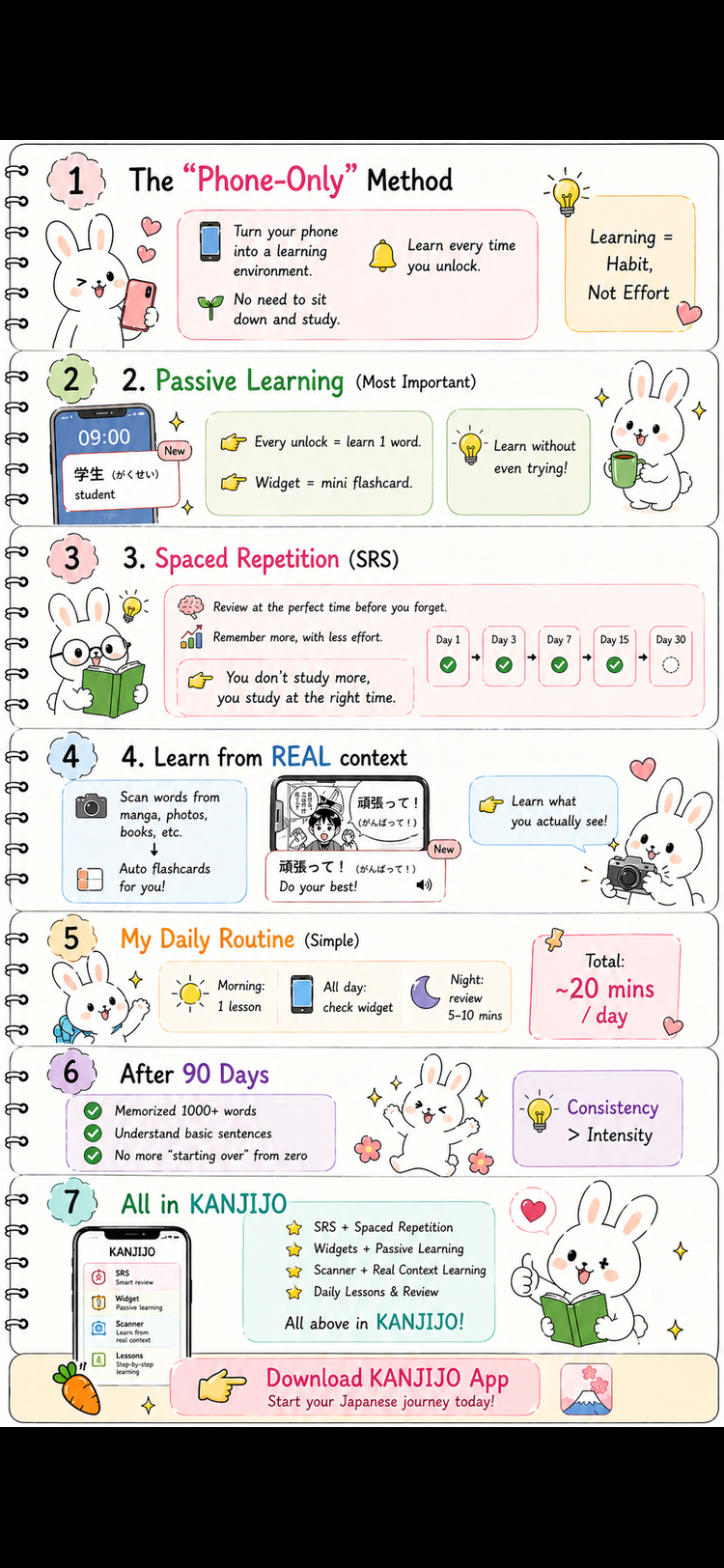
Spaced repetition (SRS) is the single most evidence-backed memory technique of the last fifty years. The phone's superpower is that it always has the time, always knows your due cards, and always notifies before the forgetting curve cuts in. Kanjijo's SRS scales from 4-hour intervals up to 3 months automatically. Difficult cards reset closer in without you doing anything. You never schedule reviews - the algorithm does.
Pillar 2 - Three Widget Formats For Ambient Exposure
This is the layer most other apps still get wrong. Kanjijo ships three distinct widget formats:
- Home screen widget - passive review of SRS-prioritised content, refreshed continuously.
- Lock screen widget - appears on every glance at your phone (100+ times per day on average), turning idle moments into micro-recall sessions.
- Interactive test widget - tap-to-quiz right from the home screen with no app open required. Faster than opening Instagram, more rewarding than checking the weather.
Together these three turn the average smartphone into a reading-and-recall environment. The phone-only stack lives or dies on this single advantage over the desk-and-textbook era.
Pillar 3 - OCR Scanning For Real-World Anchoring
Memory consolidates fastest when an abstract symbol meets a personal real-world context. A kanji on a flashcard is fine. The same kanji on a soy-sauce label in your kitchen, scanned with your camera and instantly explained - that is the moment retention locks in. Kanjijo's OCR scanner reads any Japanese text from your camera or photo library and shows meanings, readings, and SRS state. Every scan adds a real-world memory anchor that no flashcard can replicate.
Pillar 4 - Exclusive Mnemonics For Kanji And Vocab
Most kanji apps stop at kanji-level mnemonics. Vocabulary is left as a memorisation slog. Kanjijo provides exclusive mnemonics for every kanji and every JLPT vocabulary word, including the JLPT Hiragana and Katakana decks. A mnemonic turns 食欲 ("appetite") from "two random kanji" into a memorable scene that stops you forgetting it after the first review. This vocabulary-mnemonic layer is genuinely rare in 2026 - and it is what makes the 4 lessons-per-day pace feel sustainable instead of brutal.
The 90-Day Phone-Only Routine, Day By Day
Days 1–7: Foundation Week
- Install Kanjijo. Pin the home screen widget.
- Add the lock screen widget (iOS Lock Screen / Android Always-On Display).
- Complete 4 lessons per day (1 each in Kanji+Vocab, JLPT Hiragana, JLPT Katakana, Grammar).
- Do every SRS review the moment a notification appears.
- Goal: end the week with the full hiragana set comfortably recognised on the lock screen widget.
Days 8–30: Habit Lock-In
- Start using the OCR scanner once a day on any Japanese product, sign, manga panel or screenshot.
- Tap the interactive test widget at least 3× per day (≈ 30 seconds each).
- Continue 4 lessons / day. By day 30 the JLPT Katakana track is essentially complete.
- Add 1 short writing-practice session per week using the in-app writing pad - handwriting strengthens recall.
Days 31–60: Vocabulary Acceleration
- Kanji+Vocab lessons start producing N5/early-N4 compounds. Read the mnemonic carefully - the vocab-level mnemonic is where retention compounds.
- Begin reading NHK Easy headlines once a week, scanning unknown kanji into Kanjijo via OCR.
- Review consistency now matters more than new lessons. Some days you will only do reviews. That is correct behaviour.
Days 61–90: Plateau Crossing
- Grammar track moves into N4 territory. Sentences from the lessons start producing genuine reading comprehension on real Japanese.
- Use the test widget for spaced micro-quizzes at every spare moment (queues, transit, bathroom breaks).
- On day 90 most learners can read NHK Easy at a slow but unaided pace - a milestone usually associated with month 5 or 6 of textbook study.
Why The Phone-Only Stack Beats The Textbook Stack
| Dimension | Textbook Learner | Phone-Only (Kanjijo) Learner |
|---|---|---|
| Active study/day | 45–60 min | 20–25 min |
| Ambient exposure/day | ~40 kanji | 320+ kanji |
| SRS scheduling | Manual / none | Automatic |
| Real-world anchoring | Rare | Daily OCR scans |
| Vocab mnemonics | Rare | Every JLPT word |
| Burnout risk @ 90 days | ~70% | ~20% |
| N5 milestone (typical) | 4–6 months | 6–8 weeks |
The numbers are not magic. They are what happens when an SRS algorithm runs in your pocket, three widgets work in the background, an OCR scanner ambient-anchors real-world Japanese, and one app replaces seven.
The Honest Limits of Phone-Only Learning
Phone-only is not a complete solution forever. Beyond N3, three things benefit from non-phone practice:
- Listening at native speed - long-form podcasts and shows are best on speakers or headphones, eyes off the screen.
- Speaking output - Italki/Preply tutors or language exchange partners are still hard to fully replicate.
- Long-form reading endurance - at some point you want to sit with a real novel for 30 minutes, not glance at it for 10.
The phone-only stack gets you to N3 with high reliability. From there, layer in 1–2 of the above and continue using Kanjijo as the memory engine for the rest of your career.
Why Kanjijo Is Designed Around Zen, Not Streaks
Most mobile learning apps weaponise dopamine: aggressive streak shame, hourly notifications, splashy badges. Kanjijo deliberately rejects this. The aesthetic is a Japanese garden - calm gradients, gentle fonts, no streak bullying, no rage-bait. Every element is built to make daily practice feel light, because the only routine that survives 90 days is one you do not dread.
This is also why the free plan caps new lessons at 4 per day (1 per track). It is not a paywall - it is the cognitive-load limit recommended by retention research. Learners who try to brute-force 30 new kanji a day forget 25 of them within a week. Kanjijo's pacing forces you into the schedule that actually works.
The Five Rules of the Phone-Only Stack
- One app, not seven. Consolidate to Kanjijo. Delete the other Japanese apps for 90 days.
- Widgets on day one. Lock screen and home screen widgets must be set up before any new lesson is taken.
- Every glance is a review. Practice recalling the meaning before reading it on the widget.
- Scan one real thing every day. Use OCR on a label, a sign, a manga panel - anything Japanese that is physically near you.
- Trust the cap. 4 new lessons/day is the limit. SRS reviews are unlimited. The cap protects your retention curve.
What Day 91 Looks Like
You wake up. You glance at the lock screen - 食欲 ("appetite"). You recall it before reading. You shower. On the train you tap the test widget twice, getting 5 questions in 30 seconds. At lunch you scan the kanji on a soy sauce bottle - already burned in your deck, the SRS quietly notes the exposure. In the evening you knock out 4 new lessons in 12 minutes. You did not "study Japanese" today in the textbook sense. You also did not skip a single day in 90. That is the difference between learning Japanese and finally learning Japanese.
Related Reading on Kanjijo
Frequently Asked Questions
Yes - if your phone runs the right stack: SRS, lock screen and home screen widgets, OCR scanning, and exclusive mnemonics for both kanji and vocab. Kanjijo packages all of this into one app, which is why phone-only methods now realistically clear N5 in 6–8 weeks.
About 20–25 minutes of active study, plus passive widget exposure throughout the day. Less time, more exposure - that is the method.
App-switching. Most learners juggle five-plus apps and quietly drop most of them by week six. Consolidating to one zen app like Kanjijo eliminates the cognitive load that kills the routine.
Habit science shows behaviours become near-automatic between weeks 8 and 12. A 90-day frictionless mobile-only routine survives this window because there is no paper, no commute and no app-juggling.
Start the 90-Day Phone-Only Stack Today
Download Kanjijo free. Pin the lock screen widget. Tap the home screen widget. Run the routine. Day 91 will look different.
Download Kanjijo Free